
Feedback requests, inside the workflow you already built.
InstantFeedback installs as a HubSpot app with its own workflow actions. Asking a customer how it went stops being a separate process and becomes one more action in the automation you already run — and the answer comes back onto the contact record.
 FrodX is a HubSpot Platinum Partner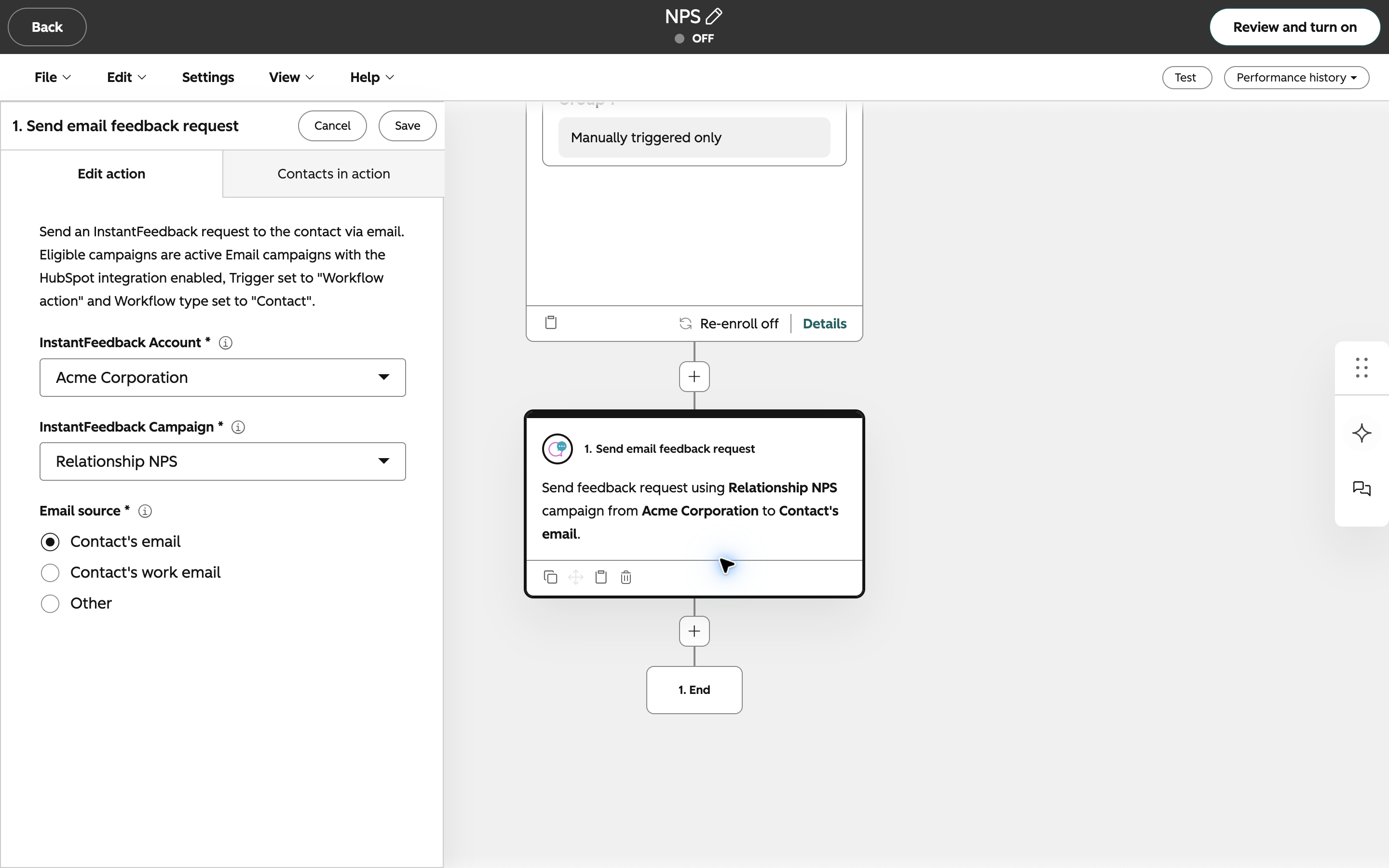
Built as a HubSpot app, not a data export.
Custom workflow actions
InstantFeedback adds its own actions to the HubSpot workflow editor: send an email feedback request, or send an SMS one. They work in contact, deal and ticket workflows — on a deal or a ticket, every associated contact is asked. Choose which property the address or number comes from, and pick the campaign it belongs to.
Triggers that already match your process
Beyond workflows, the integration ships triggers for the moments that matter — a ticket closed, a deal won, a deal lost — narrowed by pipeline and by the contact's language if you need to. Each drives its own campaign, and if the ticket reopens or the deal flips before the request goes out, the request is cancelled.
HubSpot segment imports
Point a campaign at a HubSpot segment and pull those contacts in directly — now, or on a date you schedule — with a picker in the UI and a record of past imports. No CSV round-trip, no stale export sitting in someone's downloads folder.
Results on the timeline
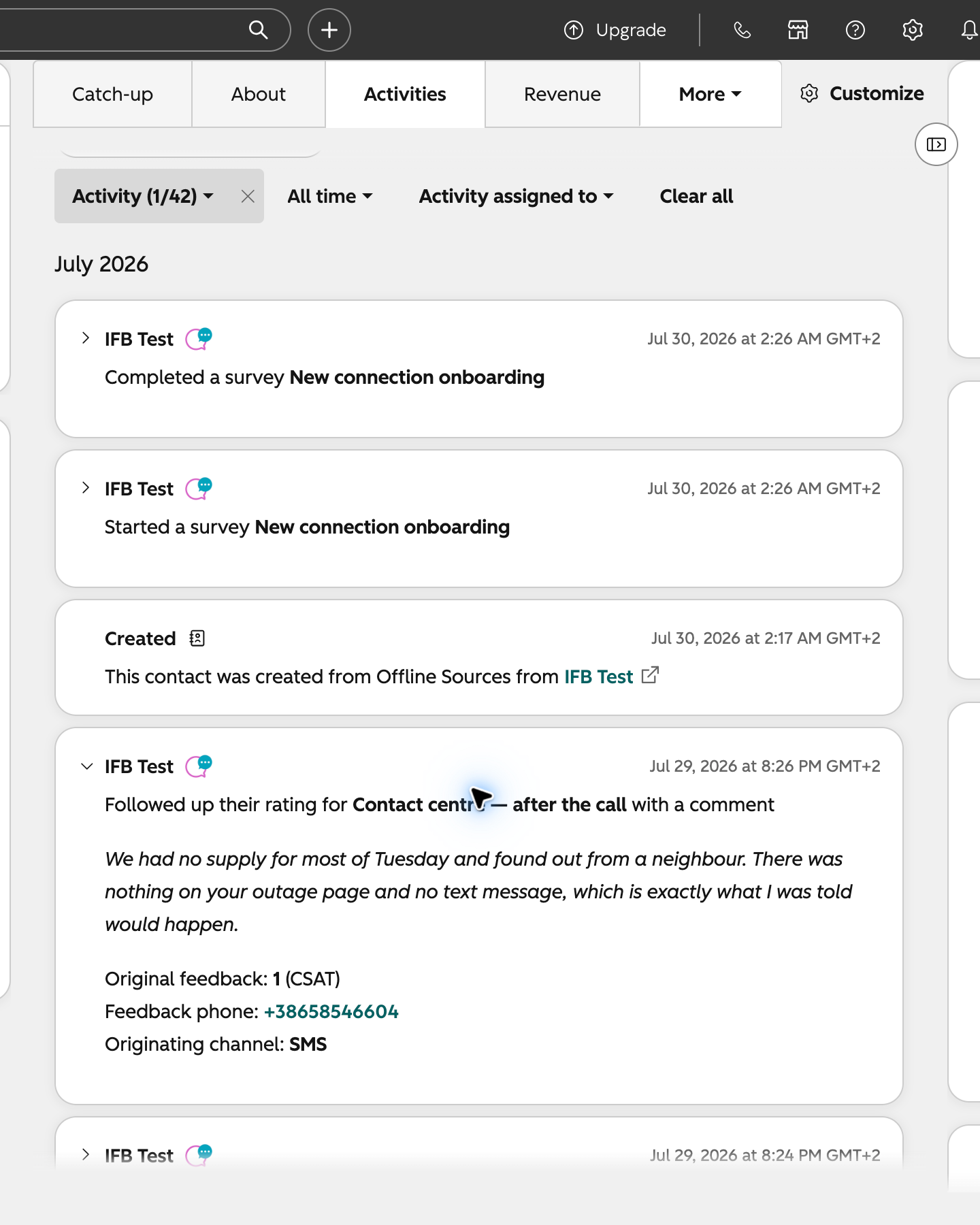
Requests, reminders, grades, comments and survey results are written as timeline events on the HubSpot contact — and on the deal or ticket behind the request — so whoever opens that record next sees the feedback history without leaving HubSpot.
Ratings you can segment on
Average ratings land on the contact, and the latest rating and comment on the contact, deal and ticket, as HubSpot properties. Build segments on them in HubSpot — detractors to work through, promoters to ask for a reference.
Web feedback matched to contacts
When feedback arrives through the web widget, contact data can be looked up from HubSpot so an anonymous response still lands against the right person where one exists — as long as the HubSpot tracking code runs on your site.
Six event types, on the records your team opens.
Every stage of a feedback request shows up as a HubSpot timeline event on the contact — and on the deal or ticket behind it — so the history is visible to whoever opens the record next: support, sales or customer success.
Three things, then it runs itself.
Connect the portal
Authorise the InstantFeedback app against your HubSpot portal once. The properties it needs are created for you, and the timeline events come with the app.
Point campaigns at moments
Decide what gets asked when: ticket closed, deal won, deal lost, a segment, or your own workflow. Each moment gets its own campaign, channel and question.
Decide who hears about it
Turn on bad-grade alerts for the people who can act, set the digest cadence, and build HubSpot segments on the rating properties.
Before you ask.
Which channels work with HubSpot?
Email, SMS, both together, and the embedded web widget. Externally-collected responses are the one campaign type the HubSpot integration doesn't cover, since there's nothing for it to trigger.
Do we need HubSpot's own feedback tool as well?
No — this replaces it rather than sitting alongside it. The differences that matter are the channel range (SMS in particular), the survey branching logic, the AI analysis of comments, and pay-per-response pricing instead of a seat-based tier.
Who sets it up?
FrodX does. FrodX is a HubSpot Platinum Partner and sells and implements InstantFeedback, so the HubSpot side of the setup — the workflows, the properties, the segment logic — is part of the engagement rather than something you're handed a document about.
Is there a limit on segment imports?
Yes — your plan sets how many segment imports each campaign can run per calendar year. Sends driven by workflows and triggers aren't affected by it.
The rest of your stack.

Emarsys
Trigger feedback requests from Emarsys programmes, and send grades, comments and survey results back out for Emvents to carry into Emarsys.
How it works
Slack
New grades and comments posted into the channels your team reads, with comments routed by grade and daily, weekly or monthly reports alongside.
How it works
Microsoft Teams
New grades and comments posted into Teams channels as cards, with comments routed by grade and daily, weekly or monthly reports — connected through a Workflows webhook.
How it works
Webhooks
Six events — request sent, reminder sent, grade, comment, survey started, survey completed — pushed to any endpoint, HMAC-SHA256 signed.
How it works
MCP server
Let AI assistants explore your feedback analytics over MCP — read-only, with personal data left out and access controlled per user and per campaign.
How it worksSee it running against your own HubSpot portal.
We'll walk through the workflow actions, the timeline events and the segment logic on a call — and tell you if it isn't a fit.